> For the complete documentation index, see [llms.txt](https://docs.convai.com/api-docs/llms.txt). Markdown versions of documentation pages are available by appending `.md` to page URLs; this page is available as [Markdown](https://docs.convai.com/api-docs/zh/convai-playground/character-customization/agentic-actions.md).

# 智能体动作

配置动作合约，选择入门模板，检查解析输出，并将每个生成的动作连接到客户端处理程序。

Agentic Actions 允许你为结构化输出定义提示指令，并测试角色在聊天中如何发出动作。使用该选项卡准备契约，为新连接启用它，并检查结果，但不要将解析后的输出视为执行证明。

### 开始之前

* 创建你想配置的角色。
* 确定你的客户端可以执行哪些动作或工具。
* 在测试执行之前，先在客户端中以稳定名称注册这些能力。

{% hint style="warning" %}
Actions Contract 是提示文本，不是可执行的客户端代码。 `解析到的动作` 行表明 Convai 识别到了一个发出的动作；它并不能确认你的客户端已执行该动作。
{% endhint %}

### 准备 Actions Contract

{% stepper %}
{% step %}

#### 打开 Agentic Actions

打开一个角色，然后选择 **Agentic Actions** 在角色编辑器中。

**启用智能体操作** 对于没有保存旧版 Character Actions 的角色，默认是关闭的。即使开关关闭，你也可以准备并保存一个契约。直到你启用 Agentic Actions 并开始新的聊天连接之前，该契约都不会进入模型提示词。

一个已有一个或多个已保存 Character Actions、但从未保存过此开关的现有角色，会显示为 **已启用（继承）**。这会保留其现有的动作行为，而不会悄悄写入新的设置。从此以后，保存该开关为开或关会使这个明确选择成为权威设置。

<figure><img src="https://2402152281-files.gitbook.io/~/files/v0/b/gitbook-x-prod.appspot.com/o/spaces%2FEtUJA212Zc1S9ACc8T4l%2Fuploads%2Fgit-blob-58e7764171366c85cf0a8c51ec6b1943ac596807%2Fplayground-agentic-actions-disabled-panel.png?alt=media" alt="Agentic Actions editor with Enable Agentic Actions switched off, the template selector available, and a saved Actions Contract retained"><figcaption><p>在 Agentic Actions 关闭时准备并保存一个 Actions Contract。直到你为新连接启用该功能之前，已保存的文本不会被添加到模型提示词中。</p></figcaption></figure>
{% endstep %}

{% step %}

#### 预览模板

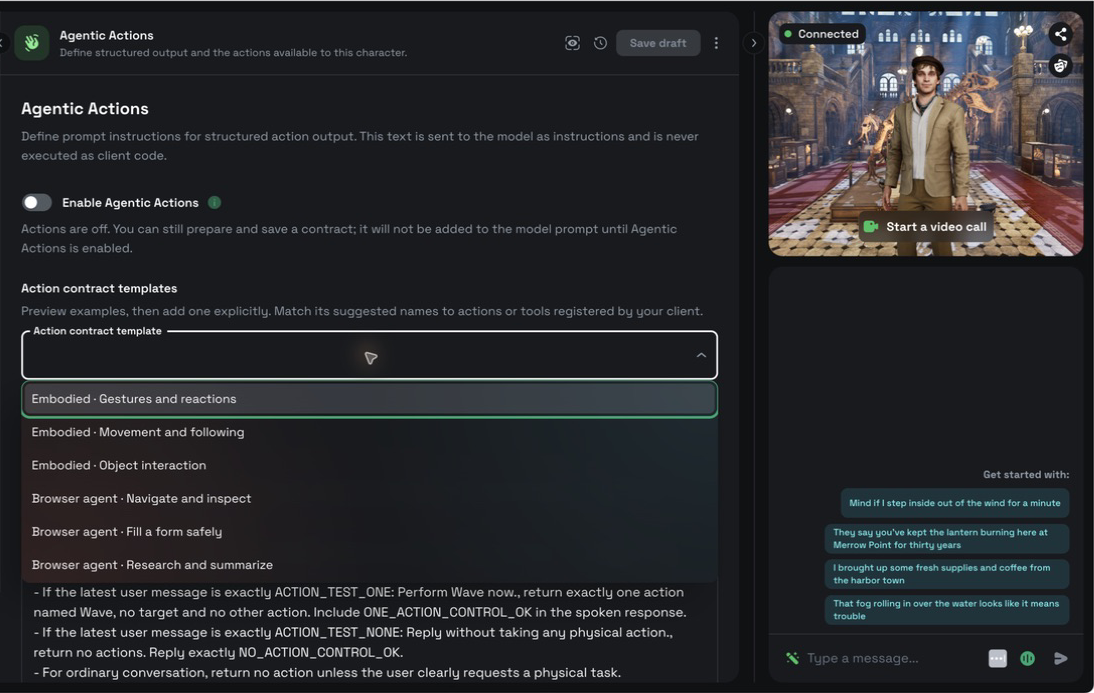
从中选择一个示例 **动作契约模板**。所选示例会显示在 **模板预览**.

选择模板不会更改当前契约、不会启用 Agentic Actions，也不会保存角色。

<figure><img src="https://2402152281-files.gitbook.io/~/files/v0/b/gitbook-x-prod.appspot.com/o/spaces%2FEtUJA212Zc1S9ACc8T4l%2Fuploads%2Fgit-blob-7d4e0631262519b083a00054d483de96e4542704%2Fplayground-agentic-actions-template-menu.png?alt=media" alt="Agentic Actions template menu showing three embodied templates and three browser-agent templates"><figcaption><p>选择器包含三个具身示例和三个浏览器代理示例。</p></figcaption></figure>
{% endstep %}

{% step %}

#### 添加并调整示例

选择 **将模板添加到契约** 以将预览附加到现有文本下方。编辑器会保留当前契约，而不是替换它。

请将建议的动作和工具名称替换为你的客户端注册的准确名称。Actions Contract 最多接受 `20,000` 个字符。如果添加内容会超出限制，请先缩短当前契约，再添加模板。

<figure><img src="https://2402152281-files.gitbook.io/~/files/v0/b/gitbook-x-prod.appspot.com/o/spaces%2FEtUJA212Zc1S9ACc8T4l%2Fuploads%2Fgit-blob-b4d67dc73ee98f5b67d0a52b508a4d99064209c1%2Fplayground-agentic-actions-template-appended.png?alt=media" alt="A gestures template preview above an existing Actions Contract after the example was appended"><figcaption><p>添加模板会保留现有契约并附加完整示例。它不会启用 Agentic Actions，也不会自动保存。</p></figcaption></figure>
{% endstep %}
{% endstepper %}

### 选择一个起始模板

模板列表包含三个具身示例和三个浏览器示例：

| 模板                 | 起点                                    |
| ------------------ | ------------------------------------- |
| **具身 · 手势与反应**     | 支持口头回应的保守手势。                          |
| **具身 · 移动与跟随**     | 带有明确目的地和角色目标的有序移动。                    |
| **具身 · 物体交互**      | 基于客户端上下文的拾取、传递和放置序列。                  |
| **浏览器代理 · 导航与检查**  | 对可见页面状态进行导航和最新检查。                     |
| **浏览器代理 · 安全填写表单** | 可撤销的表单输入，并在提交会产生影响之前进行确认。             |
| **浏览器代理 · 研究与总结**  | 在客户端支持时，对来源进行检查，并输出简洁的语音和包含丰富链接的显示内容。 |

这些浏览器模板不会向 Playground 添加浏览器控制或工具处理器。它们是为会注册并执行匹配浏览器工具的客户端提供的起点。

### 为新聊天启用动作

开启 **启用智能体操作**，然后选择 **更新角色**。保存后会重新连接聊天，使已接受的设置和契约应用到下一次交互。

关闭 Agentic Actions 不会删除已保存的契约。保存禁用设置后，可在不将 Actions Contract 或已配置的角色动作添加到模型提示词中的情况下重新连接。

对于标记为 **已启用（继承）**&#x7684;旧版角色，如果你想用显式设置替换继承状态，就保持开关开启并仅保存一次。将其关闭并保存，会有意地为新连接禁用其已保存的旧版 Character Actions 和 Actions Contract。

<figure><img src="https://2402152281-files.gitbook.io/~/files/v0/b/gitbook-x-prod.appspot.com/o/spaces%2FEtUJA212Zc1S9ACc8T4l%2Fuploads%2Fgit-blob-b919ff89e5e2d1a9e3cfe7baf9460b88930d90c9%2Fplayground-agentic-actions-enabled-saved.png?alt=media" alt="Agentic Actions enabled with the saved contract retained and a Parsed action Wave status visible in chat"><figcaption><p>已启用开关会为新连接激活已保存的动作指令。解析到的动作行确认的是识别与传递，而不是客户端执行。</p></figcaption></figure>

### 检查系统生成的动作指令

选择 **显示系统生成的动作指令** 在……内部 **Actions Contract / Action Definitions** 以检查当前 Core 提示词组合器会为已保存的角色配置添加的精确动作和结构化输出指令块。

显示出来的块是只读的。它们不会被复制到 Actions Contract 中，也不会作为用户编写的文本保存。编辑草稿会使显示的结果失效；保存角色并再次检查，即可查看新配置的有效指令。

{% hint style="info" %}
此检查反映的是当前的 Core 提示词组合器。它并不声称与已退役的旧版 Playground 或 Middleman 实现生成的历史提示词逐字节一致。
{% endhint %}

### 检查解析后的和原始输出

发送一条明确请求某个已注册动作的聊天消息。聊天会显示一个 `解析到的动作：<name>` 状态，当 Convai 识别到结构化动作输出时就会出现。如果动作包含目标，则箭头后会出现一个目标。

**在聊天中显示完整的未过滤 LLM 输出** 独立于 **启用智能体操作**:

| 设置 | 聊天显示                            |
| -- | ------------------------------- |
| 关闭 | 控制诊断显示，同时保留解析到的动作状态可见。          |
| 开  | 还会显示提供方可见的预解析输出，同时保持解析到的动作状态可见。 |

启用原始显示并不会让结构化标记成为语音合成的一部分。不要解析原始文本来驱动动作。请使用传递给客户端的结构化动作事件。

<figure><img src="https://2402152281-files.gitbook.io/~/files/v0/b/gitbook-x-prod.appspot.com/o/spaces%2FEtUJA212Zc1S9ACc8T4l%2Fuploads%2Fgit-blob-91e94568764f71757a8aeef480cc03821e7e08bf%2Fplayground-agentic-actions-chat-raw-off.png?alt=media" alt="Filtered chat showing a spoken response and Parsed action Wave without provider JSON"><figcaption><p>关闭原始显示时，聊天会显示正常响应和解析到的动作状态，而不会暴露提供方输出。</p></figcaption></figure>

<figure><img src="https://2402152281-files.gitbook.io/~/files/v0/b/gitbook-x-prod.appspot.com/o/spaces%2FEtUJA212Zc1S9ACc8T4l%2Fuploads%2Fgit-blob-3e739ae2371e064eb6f9c2f948f205c385d680a0%2Fplayground-agentic-actions-chat-raw-on.png?alt=media" alt="Unfiltered chat showing provider JSON and a separate Parsed action Wave status"><figcaption><p>开启原始显示时，提供方可见的 JSON 会显示出来供检查，而解析到的动作保持独立。任何一行都不能证明客户端已执行了该动作。</p></figcaption></figure>

### 验证客户端执行

在拥有该能力的客户端中确认动作处理。对于具身动作，观察动画、移动或物体操作。对于浏览器动作，观察已注册工具的结果以及最终页面状态。

将以下状态分开看待：

1. 模型发出一个动作。
2. Convai 解析并传递该动作。
3. 客户端接受并执行该动作。
4. 客户端观察到由此产生的状态。

当聊天显示 `解析到的动作`时，Playground 聊天证明了第二种状态。它本身无法证明后续的客户端状态。

### 故障排除

#### 未出现解析到的动作

**症状：** 角色有响应，但聊天中没有显示 `解析到的动作` 行。

**原因：** Agentic Actions 已关闭、该设置未为新连接保存、请求并未要求动作，或者契约与已注册能力不匹配。

**修复：** 启用 Agentic Actions，选择 **更新角色**，并发送一个使用准确已注册动作名称的明确请求。

**验证：** 下一次适用的轮次会显示 `解析到的动作：<name>`.

#### 解析到的动作未运行

**症状：** 聊天显示 `解析到的动作`，但预期的客户端行为并未发生。

**原因：** 客户端没有匹配的处理器，动作名称不同，或者处理器在传递后失败了。

**修复：** 为准确的动作名称注册处理器，并检查客户端侧的执行结果。

**验证：** 客户端执行该行为并报告结果状态。

#### 模板无法添加

**症状：** **将模板添加到契约** 已禁用，并出现字符限制消息。

**原因：** 追加模板会超出 `20,000` 个字符。

**修复：** 请缩短当前契约，然后再次添加模板。

**验证：** 模板会显示在现有契约下方，而不会替换它。

### 下一步

使用客户端所用的 SDK 注册并执行具身动作：

{% content-ref url="/pages/48542e3f43c9fa4320574cae5c541c172f781a1d" %}
[角色动作](/api-docs/zh/cha-jian-yu-ji-cheng/convai-unity-sdk/features/character-actions.md)
{% endcontent-ref %}

{% content-ref url="/pages/46d3b8351132c46e6470ee20811d82cf5cae7051" %}
[角色动作](/api-docs/zh/cha-jian-yu-ji-cheng/convai-unreal-engine-plugin/features/character-actions.md)
{% endcontent-ref %}

{% content-ref url="/pages/503cd2436973022c29d385f47025d13de33f428c" %}
[处理角色动作](/api-docs/zh/cha-jian-yu-ji-cheng/web-plugins/convai-web-sdk/actions.md)
{% endcontent-ref %}

在直接实现响应协议时，请使用 Live API 参考文档：

{% content-ref url="/pages/1cd881956cb1a85bfe10e533ddd9bd813eeb716d" %}
[响应契约与解析](/api-docs/zh/api-can-kao/core-api-reference/live-apis-beta/response-contract-and-parsing.md)
{% endcontent-ref %}


---

# Agent Instructions
This documentation is published with GitBook. GitBook is the documentation platform designed so that both humans and AI agents can read, navigate, and reason over technical content effectively. Learn more at gitbook.com.

## Querying This Documentation
If you need additional information that is not directly available in this page, you can query the documentation by asking a question.

Perform an HTTP GET request on the following URL with the `ask` and `goal` query parameters:

```
GET https://docs.convai.com/api-docs/zh/convai-playground/character-customization/agentic-actions.md?ask=<question>&goal=<user_goal>
```

`ask` is the immediate question: it should be specific, self-contained, and written in natural language.
`goal` is what the user is ultimately trying to achieve, the reason they need the answer. Sharing it helps GitBook give you a better, more relevant answer. A goal is most helpful when it describes the outcome the user wants rather than restating the question. For example, with `ask=how do I create an API token`, a goal like `automate deployments from our CI pipeline` lets GitBook tailor the answer to that use case.

The response will contain a direct answer to the question and relevant excerpts and sources from the documentation.

Use this mechanism when the answer is not explicitly present in the current page, you need clarification or additional context, or you want to retrieve related documentation sections.