> For the complete documentation index, see [llms.txt](https://docs.convai.com/api-docs/llms.txt). Markdown versions of documentation pages are available by appending `.md` to page URLs; this page is available as [Markdown](https://docs.convai.com/api-docs/zh/cha-jian-yu-ji-cheng/unreal-engine/guides/event-aware-convai-characters.md).
# 支持事件感知的 Convai 角色
本文档通过一个小示例说明了如何让角色对周围环境中发生的事件做出响应。
## Invoke Speech 函数的使用
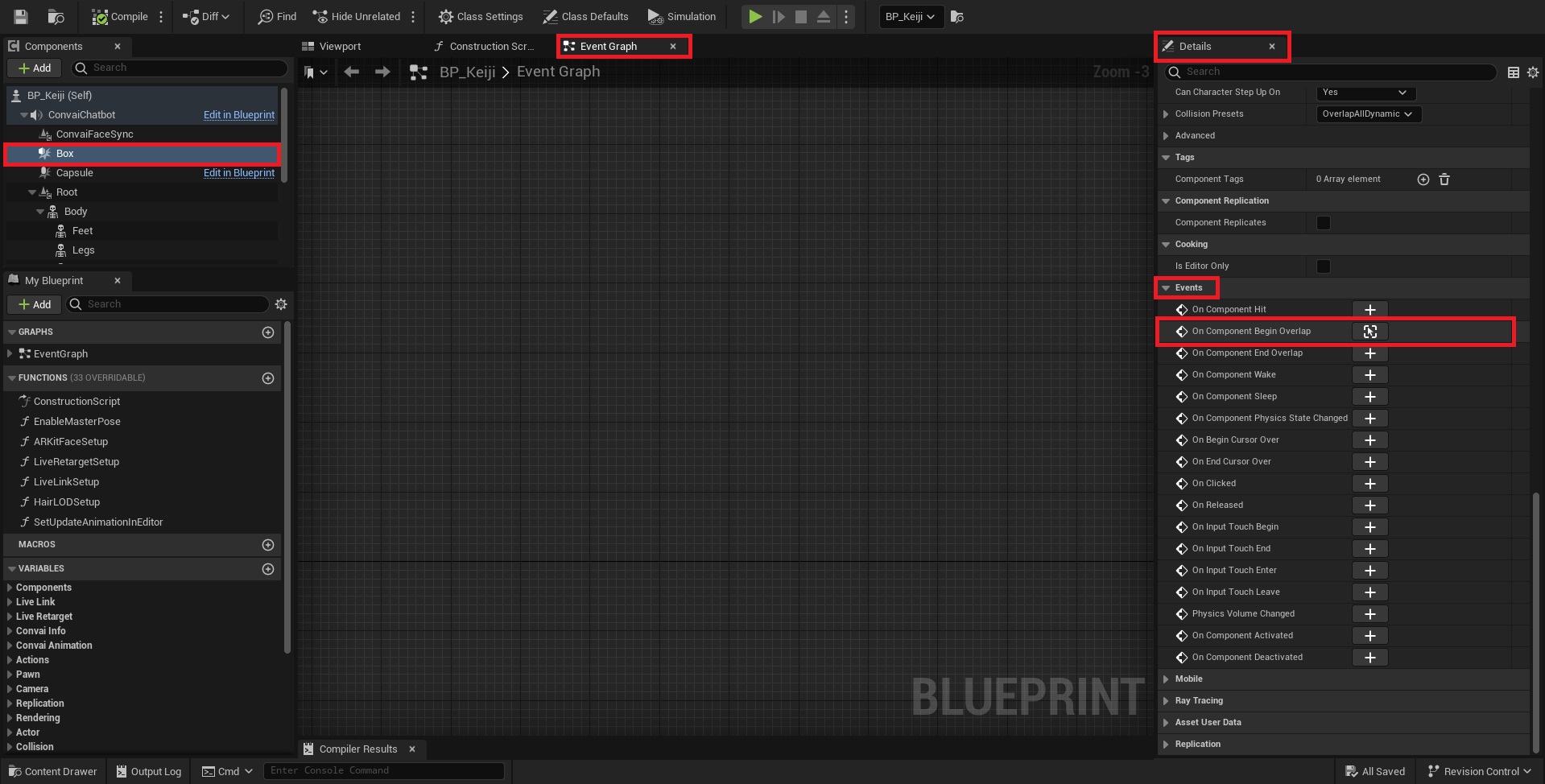
在这个示例中的目标是:当玩家进入某个区域时,让角色向玩家打招呼,这可以通过使用 `调用语音` 节点来实现,它基本上会调用 AI 角色说话,再配合一个简单的碰撞盒。
1. 打开你的 AI 角色蓝图并选择 `视口` 选项卡。\
注意:角色蓝图可以是 MetaHuman、ReadyPlayerMe、Reallusion,甚至是你创建的自定义蓝图,只需确保它具有 `Convai 聊天机器人` 组件。
2. 从 `组件` 列表中添加一个 `盒体碰撞`.
7. 输入一个 `触发消息` ,用于说明发生了什么(例如:“玩家靠近”),并且你可以添加一个简单的指令(例如:向玩家问好)。
8. 将 `生成动作中的` 是位于 `语音响应中的` 布尔值设为 true 将分别允许 Convai 角色执行动作并生成语音回复。
9. 点击 `编译` 是位于 `保存` 然后运行程序。
10. 当接近某个范围时会触发该事件,Convai 角色将按照 Trigger Message 中所述向角色打招呼。
{% hint style="success" %}
上面的示例只是一个简单的用例。然而,Invoke Speech 的使用为无限的用例打开了新的大门。
{% endhint %}
---
# Agent Instructions
This documentation is published with GitBook. GitBook is the documentation platform designed so that both humans and AI agents can read, navigate, and reason over technical content effectively. Learn more at gitbook.com.
## Querying This Documentation
If you need additional information that is not directly available in this page, you can query the documentation dynamically by asking a question.
Perform an HTTP GET request on the current page URL with the `ask` query parameter, and the optional `goal` query parameter:
```
GET https://docs.convai.com/api-docs/zh/cha-jian-yu-ji-cheng/unreal-engine/guides/event-aware-convai-characters.md?ask=&goal=
```
`ask` is the immediate question: it should be specific, self-contained, and written in natural language.
`goal` is optional and describes the broader end goal you are ultimately trying to accomplish on behalf of the user. GitBook uses it to tailor the answer towards what is most useful for that goal.
The response will contain a direct answer to the question and relevant excerpts and sources from the documentation.
Use this mechanism when the answer is not explicitly present in the current page, you need clarification or additional context, or you want to retrieve related documentation sections.