> For the complete documentation index, see [llms.txt](https://docs.convai.com/api-docs/llms.txt). Markdown versions of documentation pages are available by appending `.md` to page URLs; this page is available as [Markdown](https://docs.convai.com/api-docs/zh/cha-jian-yu-ji-cheng/unity-plugin-beta-overview/features/dynamic-context/static-context-at-connection-time.md).
# 连接时的静态上下文
在说出第一句话之前先建立角色已知的信息——一个在整个对话期间保持不变的场景描述。
## 在对话开始前设置固定的场景上下文
除了运行时动态上下文系统之外,Convai 还支持在建立对话连接时注入一段固定上下文的独立机制。此初始上下文只发送一次——在角色说出第一句话之前——非常适合描述模拟场景本身的信息,而不是会话中不断变化的状态。
了解初始上下文与运行时动态上下文之间的区别,可以避免内容缺失和重复更新。
## 初始上下文与运行时上下文
这是两个独立且互补的系统。应将它们结合使用,而不是二选一。
| | 初始上下文 | 运行时动态上下文 |
| -------------------------------- | ----------------------- | ----------------------------------------------------------- |
| **发送时间** | 在会话连接建立时发送一次 | 在会话期间的任何时间 |
| **配置方式** | `ConvaiCharacter` 检查器字段 | `ConvaiDynamicContextCommand` 或 `IConvaiDynamicContext` API |
| **可在运行时更改** | 否 | 是 |
| **清除方式 `重新发送;只会清除运行时跟踪的状态和事件。`** | 否 | 是 |
| **典型用途** | 场景标题、设施名称、角色身份 | 玩家状态、装备、错误、选择 |
对于在对话开始前就已成立、且在整个会话中不会改变的事实,请使用初始上下文。对于会随模拟推进而变化的内容,请使用运行时上下文。
## 检查器字段
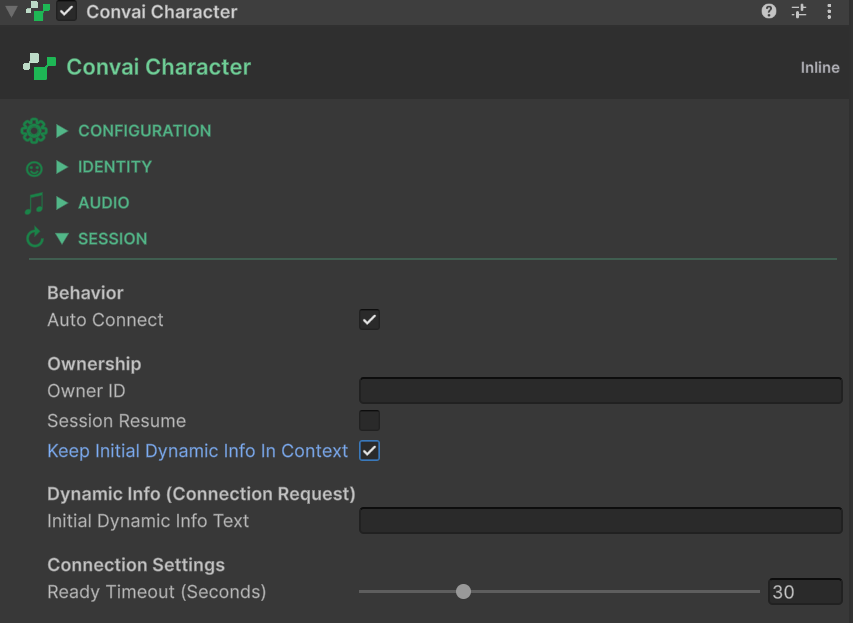
初始上下文字段位于 `ConvaiCharacter` 组件中的 **动态信息(连接请求)** 标题下。
### 初始动态信息文本
| 字段 | 类型 | 默认值 |
| ------------ | ----- | ---- |
| **初始动态信息文本** | `字符串` | `""` |
作为房间连接请求载荷的一部分原样发送的纯文本字符串。角色会在第一次对话轮次之前收到这段文本。
**格式建议:** 请使用与运行时跟踪器相同的 `"Name is Value"` 风格编写此字段。这样可确保初始上下文与随后出现的任何运行时状态更新自然融合:
```
设施是海上平台 Alpha
培训场景是井控应急
角色身份是应急响应主管
```
如果角色的人设更适合叙事式场景呈现,你也可以用纯散文的方式来编写。
### 初始动态信息保留在上下文中
| 字段 | 类型 | 默认值 |
| ----------------- | ------ | ------- |
| **初始动态信息保留在上下文中** | `bool` | `false` |
启用后,服务器会在整个会话期间将初始上下文文本保留在各个 LLM 轮次中——它会被视为角色认知的持久组成部分。禁用后,该文本会作为临时上下文注入,服务器可能不会在第一轮之后继续保留它。
对于角色在整个对话中都应记住的场景级事实(设施名称、角色、总体培训目标),请启用此项。对于只需为开场回应提供信息的一次性上下文提示,请保持禁用。
{% hint style="info" %}
调用 `重新发送;只会清除运行时跟踪的状态和事件。` 在运行时清除所有已跟踪的动态状态和事件,但它 **上的初始动态信息文本** 不会重新发送初始动态信息文本。初始上下文每次连接只发送一次,除非结束并重新开始对话,否则无法再次注入。
{% endhint %}
## 选择合适的机制
```
对话前 → 初始上下文(ConvaiCharacter 检查器)
对话中 → 运行时动态上下文(ConvaiDynamicContextCommand 或 API)
```
一个实用原则:如果你会把这条信息写进角色的系统提示词,而且它在整个会话中都不会变化,那么它应归入 **初始动态信息文本**。如果它需要反映实时模拟状态——受训者当前得分、刚拾取的装备、刚刚犯下的错误——它应归入运行时动态上下文 API。
**示例——入职培训模拟:**
| 事实 | 归属位置 |
| ----------------------------------- | -------------- |
| `“设施是 Greenfield Processing Plant”` | 初始动态信息文本 |
| `“入职角色是工艺技术员”` | 初始动态信息文本 |
| `“装备是全套 PPE”` | 运行时 `SetState` |
| `“检查点是装载区,已清场”` | 运行时 `SetState` |
| `“受训者已签署安全声明”` | 运行时 `AddEvent` |
## 在运行时读取初始上下文
初始上下文字段会作为只读属性暴露在 `ConvaiCharacter`上。可用它们在 UI 标签中显示当前场景描述,或在其他游戏系统中包含场景元数据:
```csharp
using Convai.Runtime.Components;
using TMPro;
using UnityEngine;
public class ScenarioLabel : MonoBehaviour
{
[SerializeField] private ConvaiCharacter _character;
[SerializeField] private TextMeshProUGUI _label;
private void Start()
{
if (_character != null)
_label.text = _character.InitialDynamicInfoText;
}
}
```
这些属性为:
* `ConvaiCharacter.InitialDynamicInfoText` — `字符串`,只读
* `ConvaiCharacter.InitialDynamicInfoKeepInContext` — `bool`,只读
## 接下来
* [使用示例](/api-docs/zh/cha-jian-yu-ji-cheng/unity-plugin-beta-overview/features/dynamic-context/usage-examples.md) ——查看初始上下文和运行时上下文如何在真实模拟场景中协同工作。
* [脚本 API 参考](/api-docs/zh/cha-jian-yu-ji-cheng/unity-plugin-beta-overview/features/dynamic-context/scripting-api-reference.md) ——通过 C# 游戏逻辑驱动运行时上下文。
## 结论
初始上下文和运行时动态上下文服务于不同目的,并且配合使用效果最好。请使用 `ConvaiCharacter` Inspector 字段来设定场景的固定事实,然后使用 `ConvaiDynamicContextCommand` 或脚本 API 来反映模拟推进过程中发生的变化。
---
# Agent Instructions
This documentation is published with GitBook. GitBook is the documentation platform designed so that both humans and AI agents can read, navigate, and reason over technical content effectively. Learn more at gitbook.com.
## Querying This Documentation
If you need additional information that is not directly available in this page, you can query the documentation dynamically by asking a question.
Perform an HTTP GET request on the current page URL with the `ask` query parameter, and the optional `goal` query parameter:
```
GET https://docs.convai.com/api-docs/zh/cha-jian-yu-ji-cheng/unity-plugin-beta-overview/features/dynamic-context/static-context-at-connection-time.md?ask=&goal=
```
`ask` is the immediate question: it should be specific, self-contained, and written in natural language.
`goal` is optional and describes the broader end goal you are ultimately trying to accomplish on behalf of the user. GitBook uses it to tailor the answer towards what is most useful for that goal.
The response will contain a direct answer to the question and relevant excerpts and sources from the documentation.
Use this mechanism when the answer is not explicitly present in the current page, you need clarification or additional context, or you want to retrieve related documentation sections.