> For the complete documentation index, see [llms.txt](https://docs.convai.com/api-docs/llms.txt). Markdown versions of documentation pages are available by appending `.md` to page URLs; this page is available as [Markdown](https://docs.convai.com/api-docs/zh/cha-jian-yu-ji-cheng/convai-unity-sdk/getting-started/configure-conversation-input-mode.md).
# 配置对话输入模式
在免提语音激活和按键通话之间进行选择,配置触发键或手柄按钮,并在运行时在两种模式之间切换。
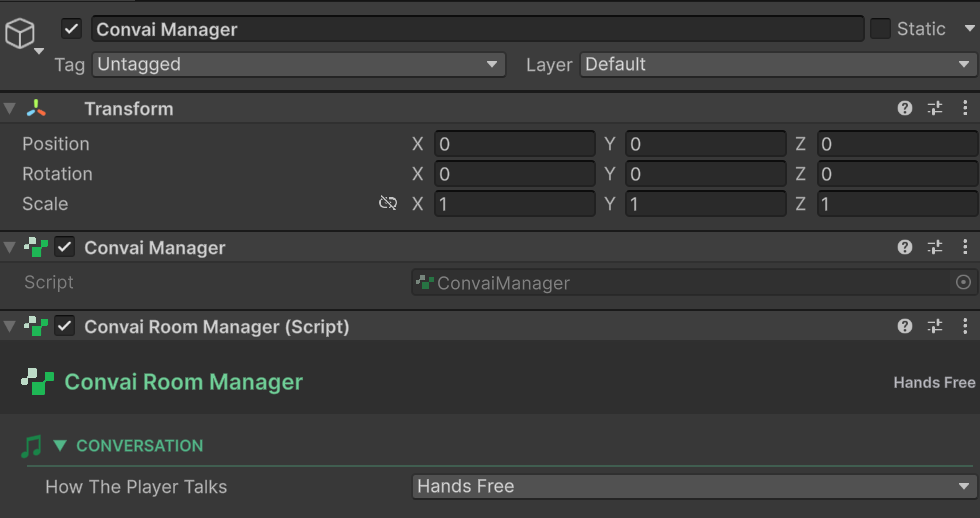
Unity 版 Convai SDK 支持两种对话输入模式: **免按键** (玩家自然发言,SDK 会在其停止时检测到)以及 **按住说话** (玩家按住一个按键发言)。这两种模式都在 `ConvaiRoomManager` 在 Inspector 中。
### 在哪里找到这些设置
选中 `ConvaiManager` 层级视图中的 GameObject。在 Inspector 中找到 `ConvaiRoomManager`。 **轮流发言选项** 部分包含所有输入模式设置。
### 输入模式对比
| | 免按键 | 按住说话 |
| --------- | -------------- | -------------- |
| **工作原理** | SDK 自动检测说话结束 | 玩家按住按键说话,松开后发送 |
| **最适合** | 自然对话、自助终端体验、VR | 嘈杂环境、多人游戏、精确控制 |
| **延迟** | 略高(静音检测延迟) | 更低(松开按键即发送) |
| **玩家操作量** | 无 | 必须按住按键 |
### 免按键模式
免按键为默认模式。将 **模式** 为 `HandsFree`.
#### 轮次检测
控制 SDK 如何判断玩家已结束发言。
| 设置 | 默认 | 说明 |
| --------------- | ------------ | ------------------------------------------------------------ |
| `TurnDetection` | `UseDefault` | `UseDefault` = 服务器默认值, `Disabled` = 始终开启的流, `Custom` = 按下方配置 |
当 `TurnDetection` 设置为 `Custom`, **智能轮次设置** 会显示:
| 设置 | 默认 | 说明 |
| ----------------- | ----- | ---------------- |
| `StopSecs` | `3.0` | 轮次结束前的静音秒数 |
| `MaxDurationSecs` | `8.0` | 强制结束前的最大轮次时长 |
| `PreSpeechMs` | `0` | 要包含的、语音开始前的音频毫秒数 |
{% hint style="info" %}
增加 `StopSecs` 可以让玩家在句子中间停顿更久而不会触发轮次结束。对于学习者在作答前先思考的训练模拟很有用。
{% endhint %}
### 按住说话模式
设置 **模式** 为 `PushToTalk`。默认按键是 **T** ——可通过 `_pushToTalkKey` 在 `ConvaiRoomManager`.
在 Meta Quest 上,按住说话会通过 Unity 的 XR 输入 API 读取 A、B、X 和 Y 按钮,而不是读取键盘按键。如果当前活动的 XR 控制器无法读取,或在按住过程中断开连接,SDK 会采用失败即关闭的方式,停止麦克风采集,而不是让它保持开启。键盘和非 XR 操纵杆的行为保持不变。
#### 本地音频策略
控制玩家设备上的麦克风行为。
| 设置 | 默认 | 说明 |
| -------------------------------- | -------------- | ----------------------------------------------------------------------- |
| `StartMutedInPushToTalk` | `true` | 麦克风启动时为静音;按键按下时激活 |
| `EnableAcousticEchoCancellation` | `false` | 为扬声器电话使用启用 AEC(Android/iOS) |
| `PushToTalkStartupMode` | `PrewarmMuted` | `PrewarmMuted` = 麦克风从一开始就打开但处于静音状态; `OpenOnFirstPress` = 麦克风仅在首次按下按键时打开 |
#### 按住说话策略
控制玩家按下和松开按住说话按键时会发生什么。
| 设置 | 默认 | 说明 |
| -------------------------------------------- | ------- | --------------------------------------------------------------- |
| `InterruptBotOnPress` | `true` | 在角色说话时按下按键会立即打断它 |
| `EnableServerSttToggle` | `true` | 在玩家没有按住按键时,暂停服务器上的 Convai 语音转文本。可降低服务器处理成本;如果你在按键时观察到识别延迟,请禁用它。 |
| `RequireTurnCompletionBeforeNextPress` | `true` | 玩家必须等角色说完后才能再次发言 |
| `TurnCompletionTimeoutMs` | `5000` | 如果完成事件始终未到达,用于解锁按住说话的备用超时(毫秒) |
| `AllowSpeechStoppedFallbackAfterSpeechStart` | `false` | 在语音已开始后,允许通过 speech-stopped 事件清除等待状态 |
### 运行时模式切换
`SetConversationInputModeAsync()` 会切换当前已连接会话的活动输入模式—— **无需重新连接**。切换会立即在实时会话中生效,并且不会更改已配置的默认值或房间配置资源。
```csharp
using System.Threading;
using Convai.Runtime.Components;
using Convai.Runtime.Room;
using UnityEngine;
public sealed class InputModeSwitcher : MonoBehaviour
{
// 切换到免按键——可从 UI 按钮或游戏事件调用
public async void SwitchToHandsFree()
{
await ConvaiManager.ActiveManager
.SetConversationInputModeAsync(ConversationInputMode.HandsFree, CancellationToken.None)
.AsTask();
}
// 切换到按住说话——可从 UI 按钮或游戏事件调用
public async void SwitchToPushToTalk()
{
await ConvaiManager.ActiveManager
.SetConversationInputModeAsync(ConversationInputMode.PushToTalk, CancellationToken.None)
.AsTask();
}
}
```
要读取当前活动模式或响应变化:
```csharp
using Convai.Runtime.Room;
// 读取当前模式
ConversationInputMode current =
ConvaiManager.ActiveManager.ActiveConversationInputMode;
// 通过房间连接服务订阅变化
if (ConvaiManager.ActiveManager.TryGetRoomConnectionService(out IConvaiRoomConnectionService roomService))
roomService.ConversationInputModeChanged += OnModeChanged;
void OnModeChanged(ConversationInputMode newMode)
{
// 更新 UI、分析、教程提示等
}
```
{% hint style="warning" %}
`SetConversationInputModeAsync()` 仅在房间处于活动 **已连接**。在房间处于 `已断开连接`, `连接中`, `重新连接中`,或 `正在断开连接` 时会失败并返回 `SessionErrorCodes.SessionInvalidState`。调用前请检查 `ConvaiManager.IsConnected` 。
{% endhint %}
连接时 `TurnTakingOptions` 定义会话的基线策略(自定义轮次检测阈值、按住说话启动行为、AEC 偏好)。运行时切换只会更改活动模式——所有其他选项都会沿用已连接会话的配置。
### 使用示例
#### 示例 1:医学训练——带延长静音的免按键
**场景:** 护理专业学生回答情景问题。他们思考时常会停顿,因此默认的 3 秒静音阈值会导致轮次过早结束。
**在 Inspector 中设置:**
* 模式: `HandsFree`
* TurnDetection: `Custom`
* StopSecs: `5.0`
* MaxDurationSecs: `30.0`
**预期结果:** 学生可以在回答过程中最多停顿 5 秒,而不会结束轮次。角色会一直等待,直到学生说完。
#### 示例 2:工业现场巡检——按住说话
**场景:** 嘈杂制造环境中的工人使用按住说话,以避免意外语音激活。他们按下 **T** 来询问设备状态。
**在 Inspector 中设置:**
* 模式: `PushToTalk`
* `_pushToTalkKey` 在 ConvaiRoomManager 上: `KeyCode.T`
* `InterruptBotOnPress`: `true` (工人可以打断较长的回复以提出后续问题)
* `EnableAcousticEchoCancellation`: `true` (存在机器噪音)
**预期结果:** 只有有意按下按键时,音频才会发送到 Convai。背景噪音不会触发回复。工人可以通过再次按下按键来打断较长的回答。
#### 示例 3:从电影过渡到游戏玩法的模式切换
**场景:** 入场动画使用免按键模式。游戏开始时,游戏会切换到按住说话,而无需重新加载场景。
```csharp
public async void OnCinematicEnd()
{
if (ConvaiManager.ActiveManager.IsConnected)
{
await ConvaiManager.ActiveManager
.SetConversationInputModeAsync(ConversationInputMode.PushToTalk, CancellationToken.None)
.AsTask();
}
}
```
**预期结果:** 模式可在会话中无缝切换。角色会不间断地继续。按住说话控制会立即生效。
### 下一步
配置好输入模式后,再调整角色语音音量和音频播放设置。
{% content-ref url="/pages/dc31c15bb8798169a403a964c726a9122812a736" %}
[配置角色音频](/api-docs/zh/cha-jian-yu-ji-cheng/convai-unity-sdk/getting-started/configure-character-audio.md)
{% endcontent-ref %}
---
# Agent Instructions
This documentation is published with GitBook. GitBook is the documentation platform designed so that both humans and AI agents can read, navigate, and reason over technical content effectively. Learn more at gitbook.com.
## Querying This Documentation
If you need additional information that is not directly available in this page, you can query the documentation by asking a question.
Perform an HTTP GET request on the following URL with the `ask` and `goal` query parameters:
```
GET https://docs.convai.com/api-docs/zh/cha-jian-yu-ji-cheng/convai-unity-sdk/getting-started/configure-conversation-input-mode.md?ask=&goal=
```
`ask` is the immediate question: it should be specific, self-contained, and written in natural language.
`goal` is what the user is ultimately trying to achieve, the reason they need the answer. Sharing it helps GitBook give you a better, more relevant answer. A goal is most helpful when it describes the outcome the user wants rather than restating the question. For example, with `ask=how do I create an API token`, a goal like `automate deployments from our CI pipeline` lets GitBook tailor the answer to that use case.
The response will contain a direct answer to the question and relevant excerpts and sources from the documentation.
Use this mechanism when the answer is not explicitly present in the current page, you need clarification or additional context, or you want to retrieve related documentation sections.