> For the complete documentation index, see [llms.txt](https://docs.convai.com/api-docs/llms.txt). Markdown versions of documentation pages are available by appending `.md` to page URLs; this page is available as [Markdown](https://docs.convai.com/api-docs/plugins-and-integrations/convai-unity-sdk/getting-started/configure-conversation-input-mode.md).
# Configure conversation input mode
Choose between hands-free voice activation and push-to-talk, configure the trigger key or controller button, and switch between the two modes at runtime.
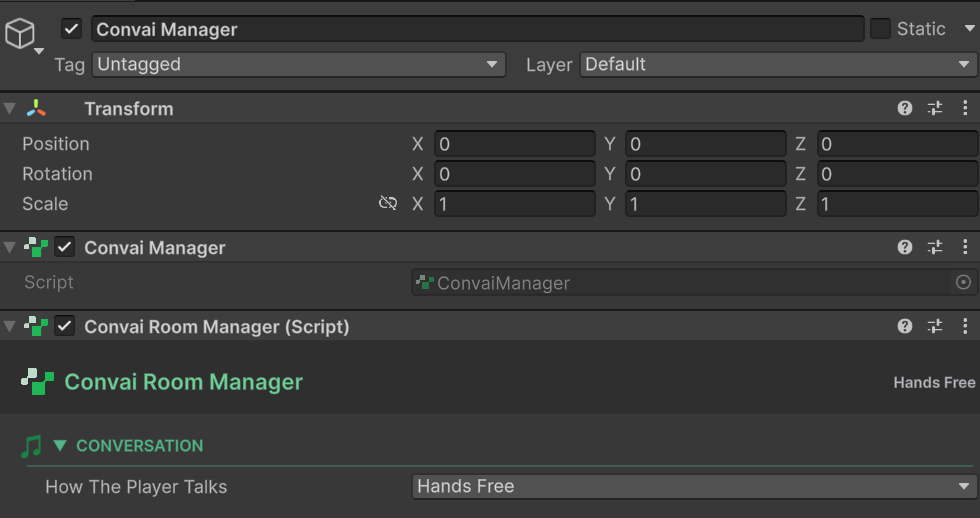
The Convai SDK for Unity supports two conversation input modes: **Hands Free** (the player speaks naturally, the SDK detects when they stop) and **Push to Talk** (the player holds a key to speak). Both modes are configured on `ConvaiRoomManager` in the Inspector.
### Where to find the settings
Select the `ConvaiManager` GameObject in the Hierarchy. In the Inspector, find `ConvaiRoomManager`. The **Turn-Taking Options** section contains all input mode settings.
### Input mode comparison
| | Hands Free | Push to Talk |
| ----------------- | ------------------------------------------- | ------------------------------------------------ |
| **How it works** | SDK detects end-of-speech automatically | Player holds a key to speak, releases to send |
| **Best for** | Natural conversation, kiosk experiences, VR | Noisy environments, multiplayer, precise control |
| **Latency** | Slightly higher (silence detection delay) | Lower (send on key release) |
| **Player effort** | None | Must hold a key |
### Hands free mode
Hands Free is the default. Set **Mode** to `HandsFree`.
#### Turn detection
Control how the SDK decides the player has finished speaking.
| Setting | Default | Description |
| --------------- | ------------ | ---------------------------------------------------------------------------------------- |
| `TurnDetection` | `UseDefault` | `UseDefault` = server default, `Disabled` = always-on stream, `Custom` = configure below |
When `TurnDetection` is set to `Custom`, the **Smart Turn Settings** appear:
| Setting | Default | Description |
| ----------------- | ------- | ---------------------------------------------------- |
| `StopSecs` | `3.0` | Seconds of silence before the turn ends |
| `MaxDurationSecs` | `8.0` | Maximum turn length before forced end |
| `PreSpeechMs` | `0` | Milliseconds of audio before speech onset to include |
{% hint style="info" %}
Increasing `StopSecs` gives players more time to pause mid-sentence without triggering a turn end. Useful for training simulations where learners think before answering.
{% endhint %}
### Push to talk mode
Set **Mode** to `PushToTalk`. The default key is **T** — change it via `_pushToTalkKey` on `ConvaiRoomManager`.
On Meta Quest, push-to-talk reads the A, B, X, and Y buttons through Unity's XR input API instead of a keyboard key. If the active XR controller cannot be read, or disconnects mid-press, the SDK fails closed and stops microphone capture rather than leaving it open. Keyboard and non-XR joystick behavior is unchanged.
#### Local audio policy
Controls microphone behavior on the player's device.
| Setting | Default | Description |
| -------------------------------- | -------------- | ------------------------------------------------------------------------------------------------------------- |
| `StartMutedInPushToTalk` | `true` | Microphone starts muted; activates on key press |
| `EnableAcousticEchoCancellation` | `false` | Enable AEC for speakerphone use (Android/iOS) |
| `PushToTalkStartupMode` | `PrewarmMuted` | `PrewarmMuted` = mic open but muted from start; `OpenOnFirstPress` = mic opens only when key is first pressed |
#### Push to talk policy
Controls what happens when the player presses and releases the push-to-talk key.
| Setting | Default | Description |
| -------------------------------------------- | ------- | ----------------------------------------------------------------------------------------------------------------------------------------------------------------------------- |
| `InterruptBotOnPress` | `true` | Pressing the key while the character is speaking interrupts it immediately |
| `EnableServerSttToggle` | `true` | Pauses Convai's speech-to-text on the server while the player is not holding the key. Reduces server processing cost; disable if you observe recognition delays on key press. |
| `RequireTurnCompletionBeforeNextPress` | `true` | Player must wait for the character to finish before speaking again |
| `TurnCompletionTimeoutMs` | `5000` | Fallback timeout (ms) to unlock push-to-talk if the completion event never arrives |
| `AllowSpeechStoppedFallbackAfterSpeechStart` | `false` | Allow a speech-stopped event to clear the waiting state after speech has started |
### Runtime mode switching
`SetConversationInputModeAsync()` switches the active input mode for the current connected session — **no reconnection required**. The switch takes effect immediately on the live session and does not mutate configured defaults or room profile assets.
```csharp
using System.Threading;
using Convai.Runtime.Components;
using Convai.Runtime.Room;
using UnityEngine;
public sealed class InputModeSwitcher : MonoBehaviour
{
// Switch to Hands Free — call from a UI button or game event
public async void SwitchToHandsFree()
{
await ConvaiManager.ActiveManager
.SetConversationInputModeAsync(ConversationInputMode.HandsFree, CancellationToken.None)
.AsTask();
}
// Switch to Push to Talk — call from a UI button or game event
public async void SwitchToPushToTalk()
{
await ConvaiManager.ActiveManager
.SetConversationInputModeAsync(ConversationInputMode.PushToTalk, CancellationToken.None)
.AsTask();
}
}
```
To read the current active mode or react to changes:
```csharp
using Convai.Runtime.Room;
// Read current mode
ConversationInputMode current =
ConvaiManager.ActiveManager.ActiveConversationInputMode;
// Subscribe to changes via the room connection service
if (ConvaiManager.ActiveManager.TryGetRoomConnectionService(out IConvaiRoomConnectionService roomService))
roomService.ConversationInputModeChanged += OnModeChanged;
void OnModeChanged(ConversationInputMode newMode)
{
// Update UI, analytics, tutorial prompts, etc.
}
```
{% hint style="warning" %}
`SetConversationInputModeAsync()` is valid only while the room is actively **Connected**. Calls made while the room is `Disconnected`, `Connecting`, `Reconnecting`, or `Disconnecting` fail with `SessionErrorCodes.SessionInvalidState`. Check `ConvaiManager.IsConnected` before calling.
{% endhint %}
Connect-time `TurnTakingOptions` define the session's baseline policy (custom turn detection thresholds, push-to-talk startup behavior, AEC preference). Runtime switching changes only the active mode — all other options carry over from the connected session's configuration.
### Usage examples
#### Example 1: Medical training — hands free with extended silence
**Scenario:** Nursing students answer scenario questions. They often pause while thinking, so the default 3-second silence threshold causes premature turn ends.
**Setup in Inspector:**
* Mode: `HandsFree`
* TurnDetection: `Custom`
* StopSecs: `5.0`
* MaxDurationSecs: `30.0`
**Expected outcome:** Students can pause for up to 5 seconds mid-answer without the turn ending. The character waits until the student finishes.
#### Example 2: Industrial site inspection — push to talk
**Scenario:** Workers in a noisy manufacturing environment use push-to-talk to avoid accidental voice activation. They press **T** to ask questions about equipment status.
**Setup in Inspector:**
* Mode: `PushToTalk`
* `_pushToTalkKey` on ConvaiRoomManager: `KeyCode.T`
* `InterruptBotOnPress`: `true` (workers can cut off a long response to ask a follow-up)
* `EnableAcousticEchoCancellation`: `true` (machine noise present)
**Expected outcome:** Only intentional key presses send audio to Convai. Background noise does not trigger responses. Workers can interrupt long answers with a new press.
#### Example 3: Cinematic to gameplay mode switch
**Scenario:** An onboarding cinematic uses Hands Free. When gameplay starts, the game switches to Push to Talk without reloading the scene.
```csharp
public async void OnCinematicEnd()
{
if (ConvaiManager.ActiveManager.IsConnected)
{
await ConvaiManager.ActiveManager
.SetConversationInputModeAsync(ConversationInputMode.PushToTalk, CancellationToken.None)
.AsTask();
}
}
```
**Expected outcome:** Mode switches seamlessly mid-session. The character continues without interruption. Push-to-talk controls become active immediately.
### Next steps
With input mode configured, tune character voice volume and audio playback settings.
{% content-ref url="/pages/MGgUuRj5tRGxy8aDaXHd" %}
[Configure character audio](/api-docs/plugins-and-integrations/convai-unity-sdk/getting-started/configure-character-audio.md)
{% endcontent-ref %}
---
# Agent Instructions
This documentation is published with GitBook. GitBook is the documentation platform designed so that both humans and AI agents can read, navigate, and reason over technical content effectively. Learn more at gitbook.com.
## Querying This Documentation
If you need additional information that is not directly available in this page, you can query the documentation by asking a question.
Perform an HTTP GET request on the following URL with the `ask` and `goal` query parameters:
```
GET https://docs.convai.com/api-docs/plugins-and-integrations/convai-unity-sdk/getting-started/configure-conversation-input-mode.md?ask=&goal=
```
`ask` is the immediate question: it should be specific, self-contained, and written in natural language.
`goal` is what the user is ultimately trying to achieve, the reason they need the answer. Sharing it helps GitBook give you a better, more relevant answer. A goal is most helpful when it describes the outcome the user wants rather than restating the question. For example, with `ask=how do I create an API token`, a goal like `automate deployments from our CI pipeline` lets GitBook tailor the answer to that use case.
The response will contain a direct answer to the question and relevant excerpts and sources from the documentation.
Use this mechanism when the answer is not explicitly present in the current page, you need clarification or additional context, or you want to retrieve related documentation sections.