> For the complete documentation index, see [llms.txt](https://docs.convai.com/api-docs/llms.txt). Markdown versions of documentation pages are available by appending `.md` to page URLs; this page is available as [Markdown](https://docs.convai.com/api-docs/plugins-and-integrations/convai-unity-sdk/features/dynamic-context/static-context-at-connection-time.md).

# Static context at connection time

Every Convai character has two fields — **Initial Dynamic Info Text** and **Initial Dynamic Info Keep In Context** — that inject a fixed block of context into the session request at the moment the conversation connects. This context is delivered to Convai once, before the first response, and is separate from runtime Dynamic Context updates.

Use this mechanism for facts that are true before the conversation begins and will not change during the session: the facility name, the character's role, the training scenario type, or the starting conditions of a drill. Use runtime Dynamic Context (`ConvaiDynamicContextCommand` or `IConvaiDynamicContext`) for everything that evolves as the session progresses.

### Inspector configuration

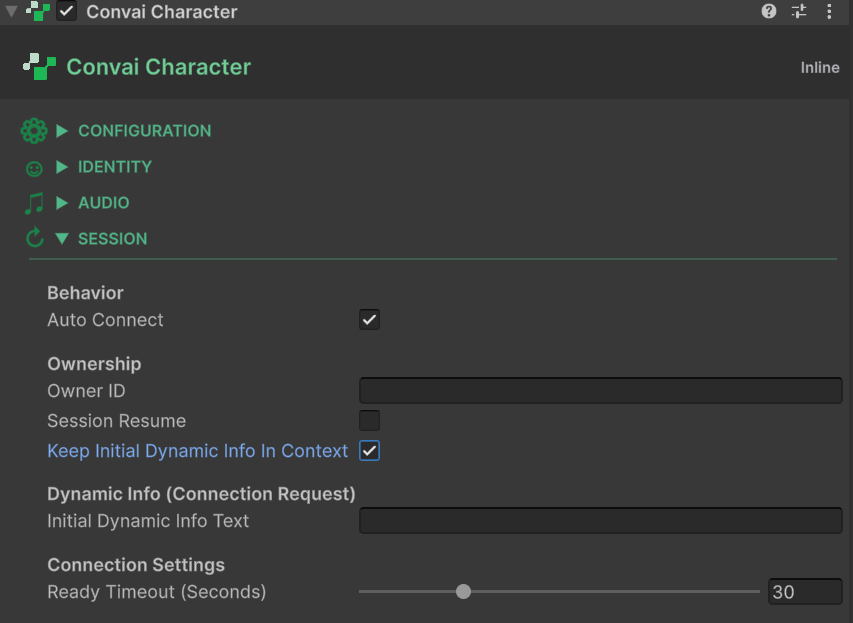
Both fields are on the `ConvaiCharacter` component under the **Dynamic Info (Connection Request)** header.

<figure><img src="/files/ffRwwcp9Oq1h6dFpTchS" alt="Unity Inspector showing the Dynamic Info (Connection Request) section on ConvaiCharacter with Initial Dynamic Info Text and Initial Dynamic Info Keep In Context fields"><figcaption><p>Dynamic Info fields on ConvaiCharacter — Initial Dynamic Info Text is delivered once at session start; enable Keep In Context to retain these facts across all LLM turns for the duration of the session.</p></figcaption></figure>

| Field                                | Type     | Default   | Description                                                                                                                                         |
| ------------------------------------ | -------- | --------- | --------------------------------------------------------------------------------------------------------------------------------------------------- |
| Initial Dynamic Info Text            | `string` | *(empty)* | Free-text block sent as part of the session connection request. No format constraints — write plain sentences or key-value lines.                   |
| Initial Dynamic Info Keep In Context | `bool`   | `false`   | When `true`, Convai retains this text across all LLM turns for the duration of the session. When `false`, the text informs only the first response. |

{% hint style="warning" %}
**Initial Dynamic Info Keep In Context defaults to `false`.** When disabled, Convai uses the initial context text to inform the character's first response only — it is not retained across turns. If you expect the character to reference initial facts throughout a long session, enable this field. Leaving it disabled is a common cause of characters appearing to "forget" scenario context after the first exchange.
{% endhint %}

#### Example configuration

For a fire suppression certification drill, set **Initial Dynamic Info Text** to:

```
Facility: Offshore Platform Alpha
Scenario: Fire Suppression Certification Drill
Trainee role: Operator under assessment
```

Enable **Initial Dynamic Info Keep In Context**.

The character will reference these facts throughout the conversation. You do not need to re-send them via runtime Dynamic Context — they persist for the life of the session.

### Relationship to runtime Dynamic Context

Initial context and runtime Dynamic Context are complementary — not alternatives.

|                           | Initial Dynamic Info                         | Runtime Dynamic Context                         |
| ------------------------- | -------------------------------------------- | ----------------------------------------------- |
| **When sent**             | Once, at `ConnectAsync`                      | During the session, on demand                   |
| **Content**               | Fixed facts set at design time               | Live state and events set at runtime            |
| **Suitable for**          | Facility name, scenario type, character role | Trainee location, equipment state, hazard level |
| **Modifiable at runtime** | No — sent once per connection                | Yes — via `SetState`, `AddEvent`, `Reset`       |

Both mechanisms feed into the character's awareness simultaneously. Initial context provides a stable foundation; runtime Dynamic Context layers live updates on top.

```csharp
// These complement the initial context — not replace it
_character.DynamicContext.SetState("Station", "Chemical Storage Bay");
_character.DynamicContext.SetState("HazardLevel", "Extreme");
_character.DynamicContext.AddEvent("Trainee bypassed manual lockout procedure");
```

### What `Reset()` does not clear

Calling `Reset()` on the runtime Dynamic Context layer clears all tracked states and events. It does **not** affect initial dynamic info:

* **Initial Dynamic Info Text** was sent at connection time and cannot be recalled or re-sent by any runtime call.
* **System prompt facts** on the Convai dashboard are not part of the Dynamic Context layer. No SDK call affects them at runtime.
* **In-session LLM memory** — the character retains conversational context across turns within the same session. `Reset()` clears the Dynamic Context tracker and sends a Reset message to Convai, but it does not clear the model's in-session conversational memory.

{% hint style="info" %}
To change the initial context for a new session, end the current conversation, update the **Initial Dynamic Info Text** field, and reconnect. Initial context is sent once per `ConnectAsync` call.
{% endhint %}

### Scripting access

Both fields are readable via C# properties on `ConvaiCharacter`:

```csharp
string initialText = _character.InitialDynamicInfoText;
bool keepInContext = _character.InitialDynamicInfoKeepInContext;
```

These properties are read-only at runtime. Set the values in the Inspector before the scene is played, or via `SerializedObject` in a custom Editor tool.

### Next steps

{% content-ref url="/pages/o4soWlixkVqAjbqKQCzH" %}
[Command component reference](/api-docs/plugins-and-integrations/convai-unity-sdk/features/dynamic-context/command-component-reference.md)
{% endcontent-ref %}

{% content-ref url="/pages/Pwb170m39yjzkfAghzLG" %}
[Dynamic context scripting API](/api-docs/plugins-and-integrations/convai-unity-sdk/features/dynamic-context/dynamic-context-scripting-api.md)
{% endcontent-ref %}

{% content-ref url="/pages/jLDVtNvrQQtepjrSEeAv" %}
[Sync behavior and timing](/api-docs/plugins-and-integrations/convai-unity-sdk/features/dynamic-context/sync-behavior-and-timing.md)
{% endcontent-ref %}


---

# Agent Instructions
This documentation is published with GitBook. GitBook is the documentation platform designed so that both humans and AI agents can read, navigate, and reason over technical content effectively. Learn more at gitbook.com.

## Querying This Documentation
If you need additional information that is not directly available in this page, you can query the documentation dynamically by asking a question.

Perform an HTTP GET request on the current page URL with the `ask` query parameter:

```
GET https://docs.convai.com/api-docs/plugins-and-integrations/convai-unity-sdk/features/dynamic-context/static-context-at-connection-time.md?ask=<question>
```

The question should be specific, self-contained, and written in natural language.
The response will contain a direct answer to the question and relevant excerpts and sources from the documentation.

Use this mechanism when the answer is not explicitly present in the current page, you need clarification or additional context, or you want to retrieve related documentation sections.
