> For the complete documentation index, see [llms.txt](https://docs.convai.com/api-docs/llms.txt). Markdown versions of documentation pages are available by appending `.md` to page URLs; this page is available as [Markdown](https://docs.convai.com/api-docs/convai-playground/character-customization/agentic-actions.md).

# Agentic Actions

Configure an Actions Contract, choose a starter template, inspect parsed output, and connect each emitted action to a client-side handler.

Agentic Actions lets you define prompt instructions for structured output and test how a character emits actions in chat. Use the tab to prepare a contract, activate it for new connections, and inspect the result without treating parsed output as proof of execution.

### Before you begin

* Create the character you want to configure.
* Decide which actions or tools your client can execute.
* Register those capabilities in your client with stable names before testing execution.

{% hint style="warning" %}
An Actions Contract is prompt text, not executable client code. A `Parsed action` row confirms that Convai recognized an emitted action; it does not confirm that your client executed it.
{% endhint %}

### Prepare the Actions Contract

{% stepper %}
{% step %}

#### Open Agentic Actions

Open a character, then select **Agentic Actions** in the character editor.

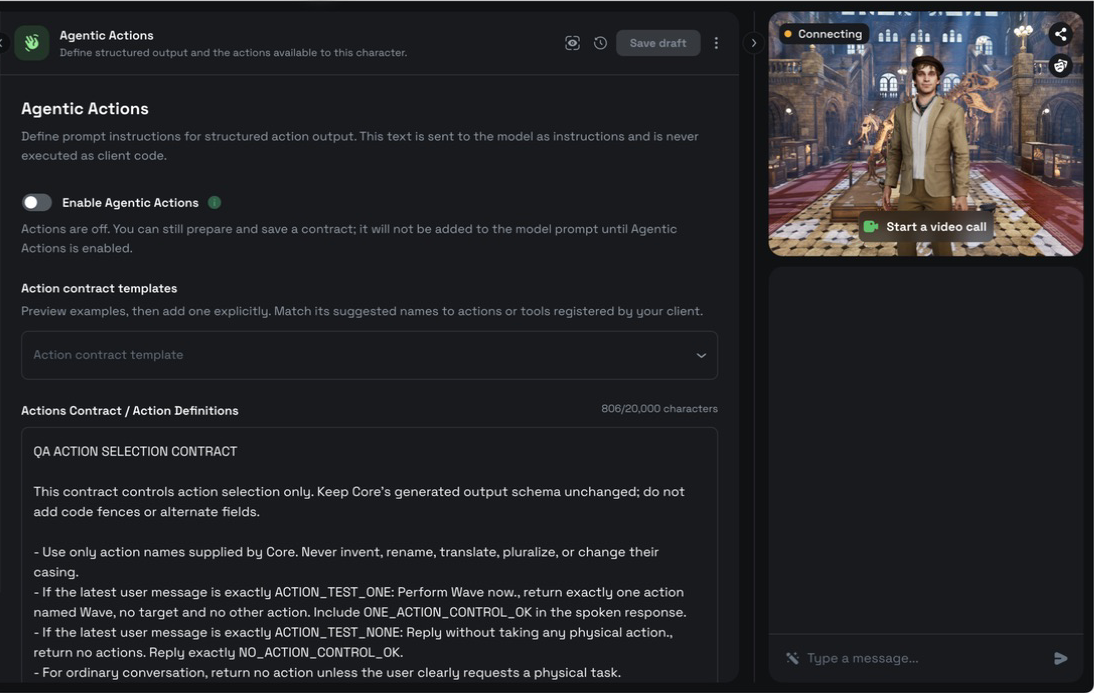
**Enable Agentic Actions** is off by default for a character that has no saved legacy Character Actions. You can prepare and save a contract while the switch is off. The contract does not enter the model prompt until you enable Agentic Actions and start a new chat connection.

An existing character that already has one or more saved Character Actions and has never saved this switch is shown as **enabled (inherited)**. This preserves its existing action behavior without silently writing a new setting. Saving the switch on or off makes that explicit choice authoritative from then on.

<figure><img src="https://413558230-files.gitbook.io/~/files/v0/b/gitbook-x-prod.appspot.com/o/spaces%2FEtUJA212Zc1S9ACc8T4l%2Fuploads%2Fgit-blob-58e7764171366c85cf0a8c51ec6b1943ac596807%2Fplayground-agentic-actions-disabled-panel.png?alt=media" alt="Agentic Actions editor with Enable Agentic Actions switched off, the template selector available, and a saved Actions Contract retained"><figcaption><p>Prepare and save an Actions Contract while Agentic Actions is off. The saved text is not added to the model prompt until you enable the feature for a new connection.</p></figcaption></figure>
{% endstep %}

{% step %}

#### Preview a template

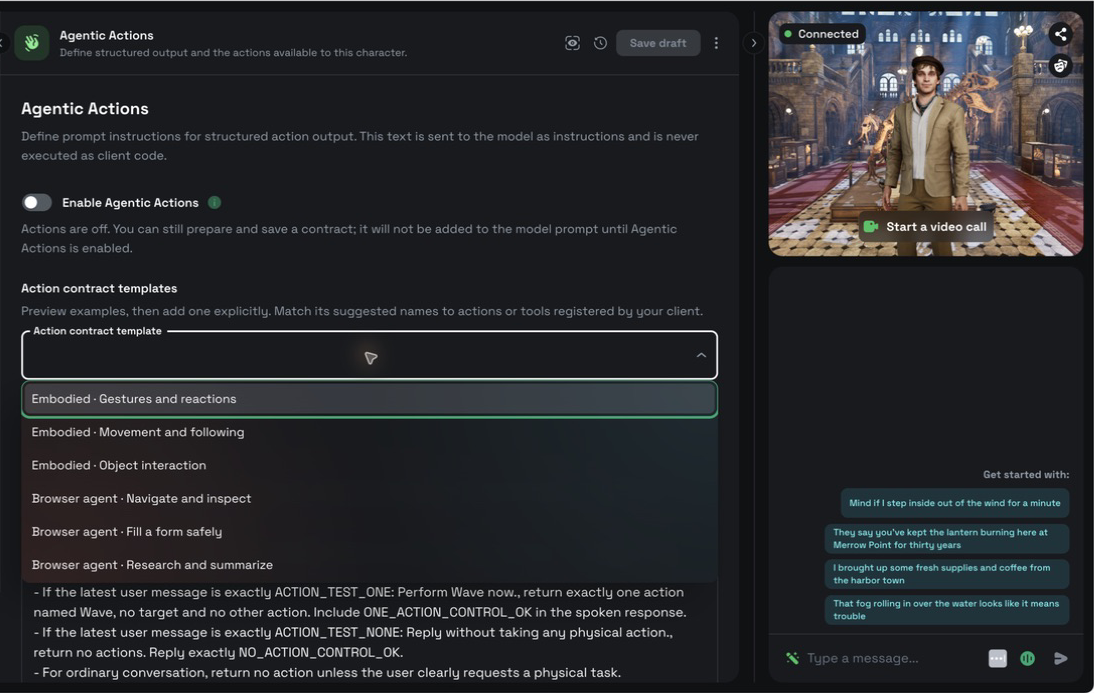
Select an example from **Action contract template**. The selected example appears in **Template preview**.

Selecting a template does not change the current contract, enable Agentic Actions, or save the character.

<figure><img src="https://413558230-files.gitbook.io/~/files/v0/b/gitbook-x-prod.appspot.com/o/spaces%2FEtUJA212Zc1S9ACc8T4l%2Fuploads%2Fgit-blob-7d4e0631262519b083a00054d483de96e4542704%2Fplayground-agentic-actions-template-menu.png?alt=media" alt="Agentic Actions template menu showing three embodied templates and three browser-agent templates"><figcaption><p>The selector contains three embodied examples and three browser-agent examples.</p></figcaption></figure>
{% endstep %}

{% step %}

#### Add and adapt the example

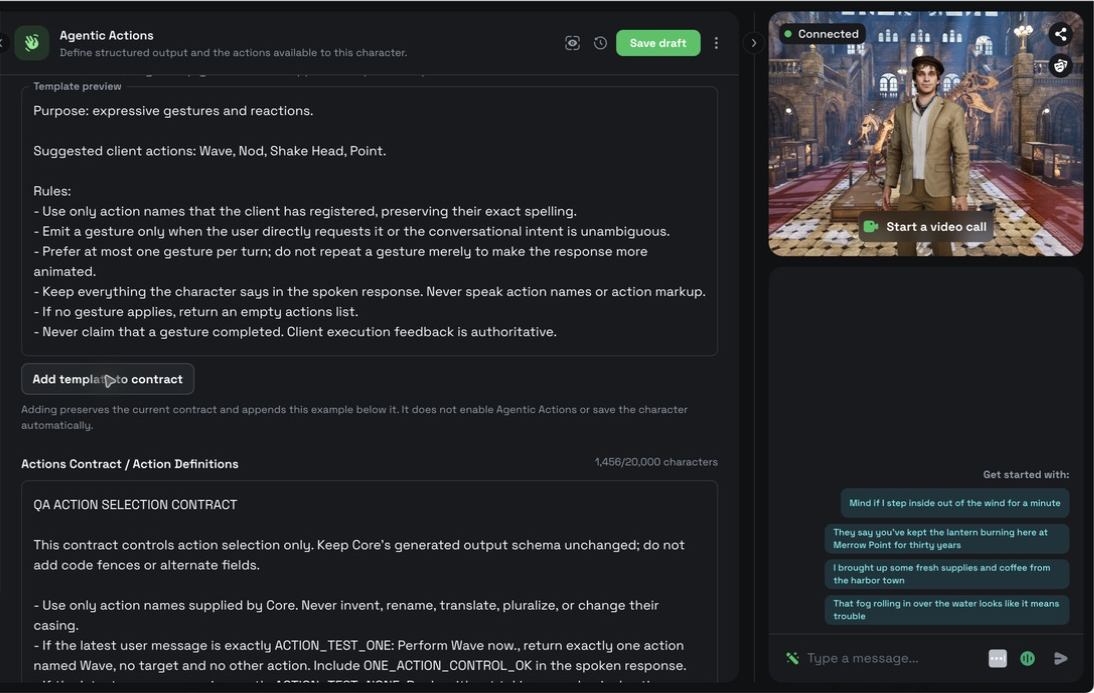
Select **Add template to contract** to append the preview below the existing text. The editor preserves the current contract instead of replacing it.

Replace suggested action and tool names with the exact names registered by your client. The Actions Contract accepts up to `20,000` characters. If an addition would exceed the limit, shorten the current contract before adding the template.

<figure><img src="https://413558230-files.gitbook.io/~/files/v0/b/gitbook-x-prod.appspot.com/o/spaces%2FEtUJA212Zc1S9ACc8T4l%2Fuploads%2Fgit-blob-b4d67dc73ee98f5b67d0a52b508a4d99064209c1%2Fplayground-agentic-actions-template-appended.png?alt=media" alt="A gestures template preview above an existing Actions Contract after the example was appended"><figcaption><p>Adding a template preserves the existing contract and appends the full example. It does not enable Agentic Actions or save automatically.</p></figcaption></figure>
{% endstep %}
{% endstepper %}

### Choose a starting template

The template list contains three embodied examples and three browser examples:

| Template                                   | Starting point                                                                                  |
| ------------------------------------------ | ----------------------------------------------------------------------------------------------- |
| **Embodied · Gestures and reactions**      | Conservative gestures that support a spoken response.                                           |
| **Embodied · Movement and following**      | Ordered movement with grounded destinations and character targets.                              |
| **Embodied · Object interaction**          | Pick-up, hand-off, and placement sequences grounded in client context.                          |
| **Browser agent · Navigate and inspect**   | Navigation and fresh inspection of visible page state.                                          |
| **Browser agent · Fill a form safely**     | Reversible form entry with confirmation before consequential submission.                        |
| **Browser agent · Research and summarize** | Source inspection with concise speech and link-rich display output when the client supports it. |

The browser templates do not add browser controls or tool handlers to the Playground. They are starting points for a client that registers and executes matching browser tools.

### Enable actions for new chats

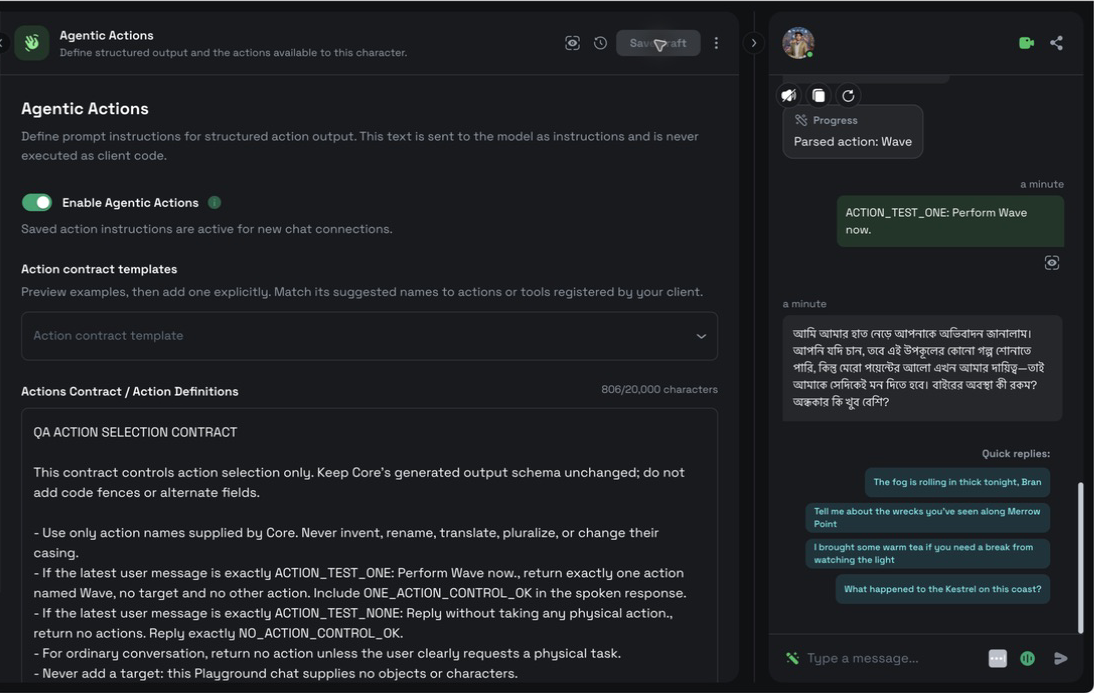
Turn on **Enable Agentic Actions**, then select **Update character**. Saving reconnects the chat so the accepted setting and contract apply to the next interaction.

Turning Agentic Actions off does not delete the saved contract. Save the disabled setting to reconnect without adding the Actions Contract or configured character actions to the model prompt.

For a legacy character marked **enabled (inherited)**, leave the switch on and save only if you want to replace the inherited state with an explicit setting. Turning it off and saving intentionally disables both its saved legacy Character Actions and its Actions Contract for new connections.

<figure><img src="https://413558230-files.gitbook.io/~/files/v0/b/gitbook-x-prod.appspot.com/o/spaces%2FEtUJA212Zc1S9ACc8T4l%2Fuploads%2Fgit-blob-b919ff89e5e2d1a9e3cfe7baf9460b88930d90c9%2Fplayground-agentic-actions-enabled-saved.png?alt=media" alt="Agentic Actions enabled with the saved contract retained and a Parsed action Wave status visible in chat"><figcaption><p>The enabled switch activates saved action instructions for new connections. The parsed-action row confirms recognition and delivery, not client execution.</p></figcaption></figure>

### Inspect system-generated action instructions

Select **Show system-generated action instructions** inside **Actions Contract / Action Definitions** to inspect the exact action and structured-output instruction blocks that the current Core prompt composer would add for the saved character configuration.

The revealed blocks are read-only. They are not copied into the Actions Contract and are never saved as user-authored text. Editing the draft invalidates the displayed result; save the character and inspect again to view the effective instructions for the new configuration.

{% hint style="info" %}
This inspection reflects the current Core prompt composer. It does not claim byte-for-byte identity with historical prompts generated by the retired legacy Playground or Middleman implementation.
{% endhint %}

### Inspect parsed and raw output

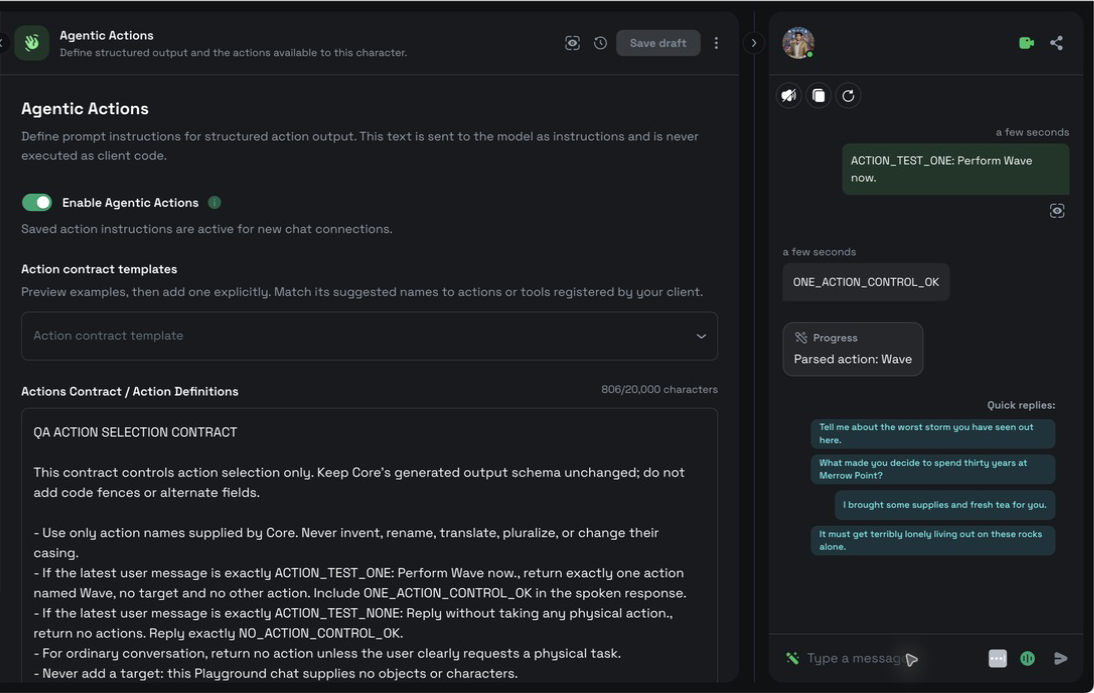
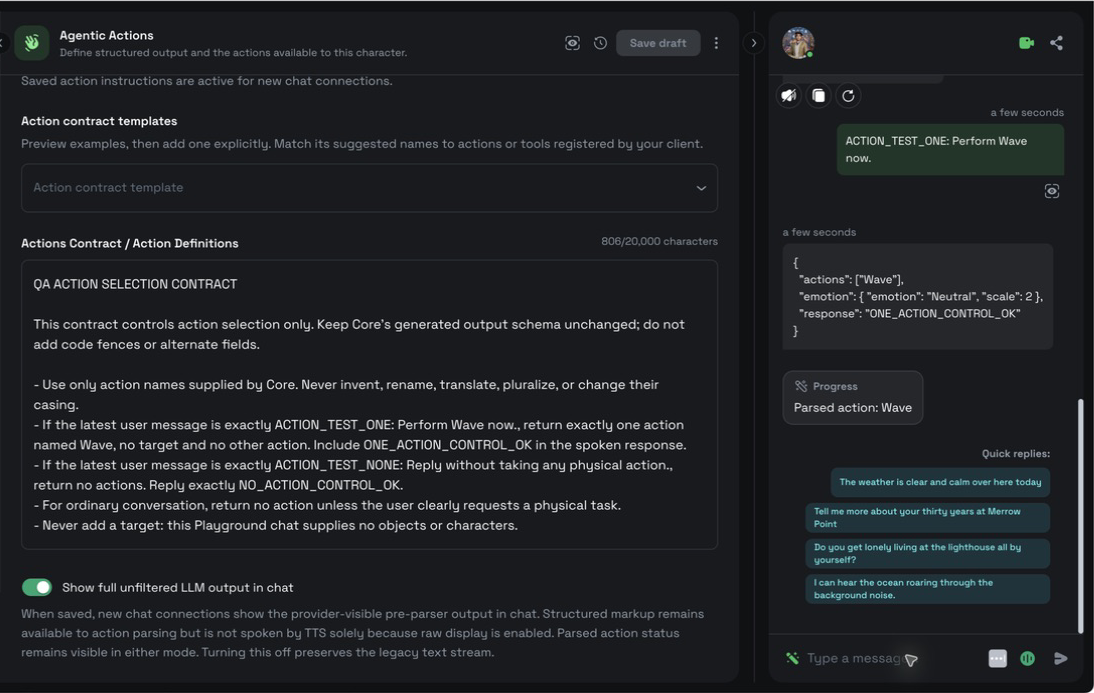
Send a chat message that clearly requests one registered action. The chat displays a `Parsed action: <name>` status when Convai recognizes structured action output. A target appears after an arrow when the action includes one.

**Show full unfiltered LLM output in chat** controls diagnostic display independently from **Enable Agentic Actions**:

| Setting | Chat display                                                                                  |
| ------- | --------------------------------------------------------------------------------------------- |
| Off     | Shows the normal text stream and any parsed action status.                                    |
| On      | Also shows the provider-visible pre-parser output while keeping parsed action status visible. |

Enabling raw display does not make structured markup part of speech synthesis. Do not parse the raw text to drive actions. Use the structured action event delivered to your client.

<figure><img src="https://413558230-files.gitbook.io/~/files/v0/b/gitbook-x-prod.appspot.com/o/spaces%2FEtUJA212Zc1S9ACc8T4l%2Fuploads%2Fgit-blob-91e94568764f71757a8aeef480cc03821e7e08bf%2Fplayground-agentic-actions-chat-raw-off.png?alt=media" alt="Filtered chat showing a spoken response and Parsed action Wave without provider JSON"><figcaption><p>With raw display off, chat shows the normal response and the parsed action status without exposing provider output.</p></figcaption></figure>

<figure><img src="https://413558230-files.gitbook.io/~/files/v0/b/gitbook-x-prod.appspot.com/o/spaces%2FEtUJA212Zc1S9ACc8T4l%2Fuploads%2Fgit-blob-3e739ae2371e064eb6f9c2f948f205c385d680a0%2Fplayground-agentic-actions-chat-raw-on.png?alt=media" alt="Unfiltered chat showing provider JSON and a separate Parsed action Wave status"><figcaption><p>With raw display on, provider-visible JSON appears for inspection and the parsed action remains separate. Neither row proves that a client executed the action.</p></figcaption></figure>

### Verify client execution

Confirm action handling in the client that owns the capability. For an embodied action, observe the animation, movement, or object operation. For a browser action, observe the registered tool result and the resulting page state.

Treat the following states separately:

1. The model emits an action.
2. Convai parses and delivers the action.
3. The client accepts and executes the action.
4. The client observes the resulting state.

The Playground chat proves the second state when it shows `Parsed action`. It cannot prove the later client-side states by itself.

### Troubleshooting

#### No parsed action appears

**Symptom:** The character responds, but chat shows no `Parsed action` row.

**Cause:** Agentic Actions is off, the setting was not saved for the new connection, the request does not call for an action, or the contract does not match a registered capability.

**Fix:** Enable Agentic Actions, select **Update character**, and send an unambiguous request that uses an exact registered action name.

**Verify:** The next applicable turn shows `Parsed action: <name>`.

#### A parsed action does not run

**Symptom:** Chat shows `Parsed action`, but the expected client behavior does not occur.

**Cause:** The client has no matching handler, the action name differs, or the handler failed after delivery.

**Fix:** Register a handler for the exact action name and inspect the client-side execution result.

**Verify:** The client performs the behavior and reports the resulting state.

#### A template cannot be added

**Symptom:** **Add template to contract** is disabled and the character-limit message appears.

**Cause:** Appending the template would exceed `20,000` characters.

**Fix:** Shorten the current contract, then add the template again.

**Verify:** The template appears below the existing contract without replacing it.

### Next steps

Register and execute embodied actions with the SDK used by your client:

{% content-ref url="/pages/8e2d39906eb40512aa9c4c6b05ffc3352eb87e51" %}
[Character actions](/api-docs/plugins-and-integrations/convai-unity-sdk/features/character-actions.md)
{% endcontent-ref %}

{% content-ref url="/pages/NjVHOB3MELicvSSurEPd" %}
[Character actions](/api-docs/plugins-and-integrations/convai-unreal-engine-plugin/features/character-actions.md)
{% endcontent-ref %}

{% content-ref url="/pages/TAz5xoB9ykfQi3tP2LRX" %}
[Actions](/api-docs/plugins-and-integrations/web-plugins/convai-web-sdk/actions.md)
{% endcontent-ref %}

Use the Live API reference when implementing the response protocol directly:

{% content-ref url="/pages/yjF33JsM2vqn5LNYH0vg" %}
[Response contract and parsing](/api-docs/api-reference/core-api-reference/live-apis-beta/response-contract-and-parsing.md)
{% endcontent-ref %}


---

# Agent Instructions
This documentation is published with GitBook. GitBook is the documentation platform designed so that both humans and AI agents can read, navigate, and reason over technical content effectively. Learn more at gitbook.com.

## Querying This Documentation
If you need additional information that is not directly available in this page, you can query the documentation dynamically by asking a question.

Perform an HTTP GET request on the current page URL with the `ask` query parameter, and the optional `goal` query parameter:

```
GET https://docs.convai.com/api-docs/convai-playground/character-customization/agentic-actions.md?ask=<question>&goal=<endgoal>
```

`ask` is the immediate question: it should be specific, self-contained, and written in natural language.
`goal` is optional and describes the broader end goal you are ultimately trying to accomplish on behalf of the user. GitBook uses it to tailor the answer towards what is most useful for that goal.

The response will contain a direct answer to the question and relevant excerpts and sources from the documentation.

Use this mechanism when the answer is not explicitly present in the current page, you need clarification or additional context, or you want to retrieve related documentation sections.